Free OnlineAI Sweater Generator
Turn a knitwear idea, sketch, motif, or permitted logo into a custom sweater concept with Mew Design - AI Design Agent. Our online AI sweater generator helps you direct the neckline, silhouette, yarn character, stitch texture, pattern placement, colorway, and presentation view, then refine the result through chat. Create visual concepts and sweater mockups for reviews, merch pitches, ecommerce planning, and seasonal campaigns without claiming that an image is a tested knitting pattern or production file.

How to Design a Sweater with AI

Brief the garment like knitwear, not a generic top: define its architecture, material language, motif behavior, and the view you need before generating.
1

Choose the Sweater Architecture

Describe the output you need and where it will be shown. Name the sweater type, neckline, fit, shoulder, sleeve, length, cuffs, hem, closure, and target wearer. A short natural-language brief is enough for the AI design agent to understand whether you mean a cropped cable crewneck, an oversized intarsia pullover, a fitted cardigan, or another knitwear direction.
2

Map the Knit, Motif, and Color

Specify yarn character and visible stitch language—fine-gauge merino, chunky wool, rib, cable, seed, jacquard, intarsia, or Fair Isle. Upload a permitted sketch, pattern, artwork, or logo and reference it with @[reference]. Tell the AI where the motif begins and ends, how often it repeats, and whether sleeves, front, back, cuffs, and collar should match.
3

Generate the Right Presentation View

Use the AI sweater design generator to create a clean flat product concept, front-and-back review sheet, colorway board, ghost-mannequin mockup, or an adult on-model editorial image. State the crop, background, camera angle, lighting, and whether the result is for an internal line review, ecommerce planning, a pitch deck, or social content.
4

Check the Knit Logic and Export

Check neckline symmetry, shoulder seams, sleeve length, cuff and hem ribbing, stitch scale, repeat rhythm, logo shape, color boundaries, front-to-back continuity, and realistic drape. Use Chat Edit to correct one issue at a time. Export a watermark-free PNG or JPG after signup, then have a knitwear technician or manufacturer validate construction, gauge, measurements, and production feasibility.
How to design a sweater with AI

Knitwear Decisions You Can See Before Sampling

Shape the Garment From Neck to Hem

A sweater is more than a graphic on a rectangle. Direct crew, V, polo, mock, turtleneck, or cardigan openings together with shoulder construction, sleeve volume, body length, fit, rib depth, and closures so the concept communicates a specific silhouette.

Make the Surface Read as Knit

Tell the AI knitwear generator whether the garment uses fine cashmere, fuzzy mohair, dry wool, cotton, boucle, or chunky yarn. Add rib, cable, waffle, seed, jersey, jacquard, or Fair Isle cues so light, stitch scale, softness, and weight support the intended material direction.

Control Motif Scale and Placement

Place a chest motif, all-over repeat, border, sleeve stripe, yoke pattern, intarsia panel, embroidery, or appliqué deliberately. The custom sweater generator can explore visual placement, but you should still review repeats, seam crossings, color counts, and whether the artwork is practical for the chosen knit method.

Develop Brand Artwork Into Knit Direction

Upload a permitted logo, mascot, illustration, or seasonal graphic, reference it with @, and ask for a simplified knit interpretation. This is useful for team merchandise and branded sweater concepts, while final trademark rights, stitch translation, and manufacturer specifications remain your responsibility.

Compare Colorways and Product Views

Create consistent variations in restrained neutrals, collegiate colors, luxury tones, bright streetwear palettes, or holiday combinations. Review the same AI sweater design as a flat, front-and-back sheet, on-model mockup, or grouped colorway board before selecting a direction.

Revise the Details Through Conversation

Use Chat Edit when a cable disappears, a motif stretches, ribbing changes width, a logo warps, a sleeve becomes uneven, or the knit looks printed. Free AI credits after signup let you test directions and export watermark-free PNG or JPG visuals for the next design conversation.

How to Prompt an AI Sweater Design That Reads as Knitwear

Create a premium unisex sweater concept for a small winter capsule. Oversized crewneck with a dropped shoulder, slightly cropped body, full sleeves, 7 cm ribbed cuffs and hem, and a clean ribbed collar. Use medium-gauge undyed oatmeal wool with visible softness and subtle natural fiber variation. Place a two-color forest-green and charcoal geometric jacquard band across the upper chest and sleeves; repeat it evenly, keep the lower body plain, and do not distort the motif at the armholes. Show one front flat view and one back flat view on a warm-gray studio background with soft side light, realistic knit texture, clean seams, and no model, hanger, text, or unrelated logo. This is a visual design concept only, not a knitting pattern or tech pack.
For a useful AI sweater generator prompt, describe the garment architecture, yarn and stitch character, motif map, colorway, presentation view, and what must stay visually consistent.
  • Build the silhouette: Name neckline, fit, shoulder, sleeve shape, body length, closure, cuff, hem, rib depth, and target wearer instead of saying only ‘cozy sweater.’
  • Describe yarn and stitch: Use material and construction cues such as fine-gauge merino, brushed mohair, chunky wool, cable, rib, seed, waffle, intarsia, jacquard, or Fair Isle. Avoid claiming an exact fiber performance from a visual alone.
  • Map the motif: State motif size, repeat rhythm, color count, placement on the yoke, chest, sleeves, cuffs, or hem, and whether a logo or reference must be simplified without losing its defining shape.
  • Choose the review view: Ask for a flat, front-and-back sheet, detail crop, colorway board, ghost mannequin, or adult on-model image. Require checks for symmetry, seams, ribbing, repeats, drape, and front-to-back consistency.

AI Sweater Prompts for Six Knitwear Directions

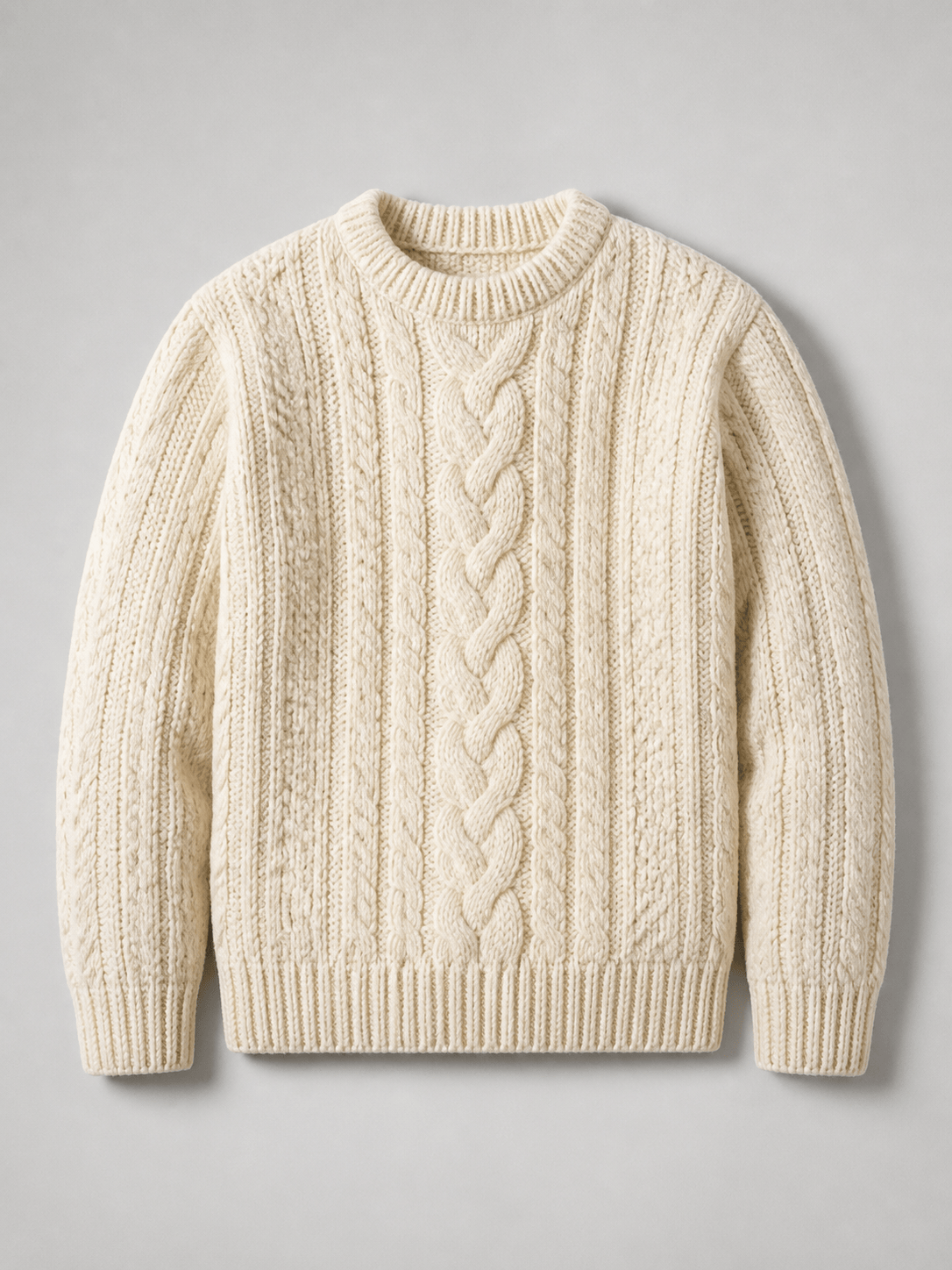
Cable knit essential: Create a premium cream cable-knit crewneck sweater design. Relaxed unisex fit, saddle shoulders, thick wool yarn, broad central braided cables, smaller rope cables beside them, deep 2×2 ribbing at collar, cuffs, and hem. Show a centered front flat product view on light gray with soft studio shadows, realistic loops and no text or branding.

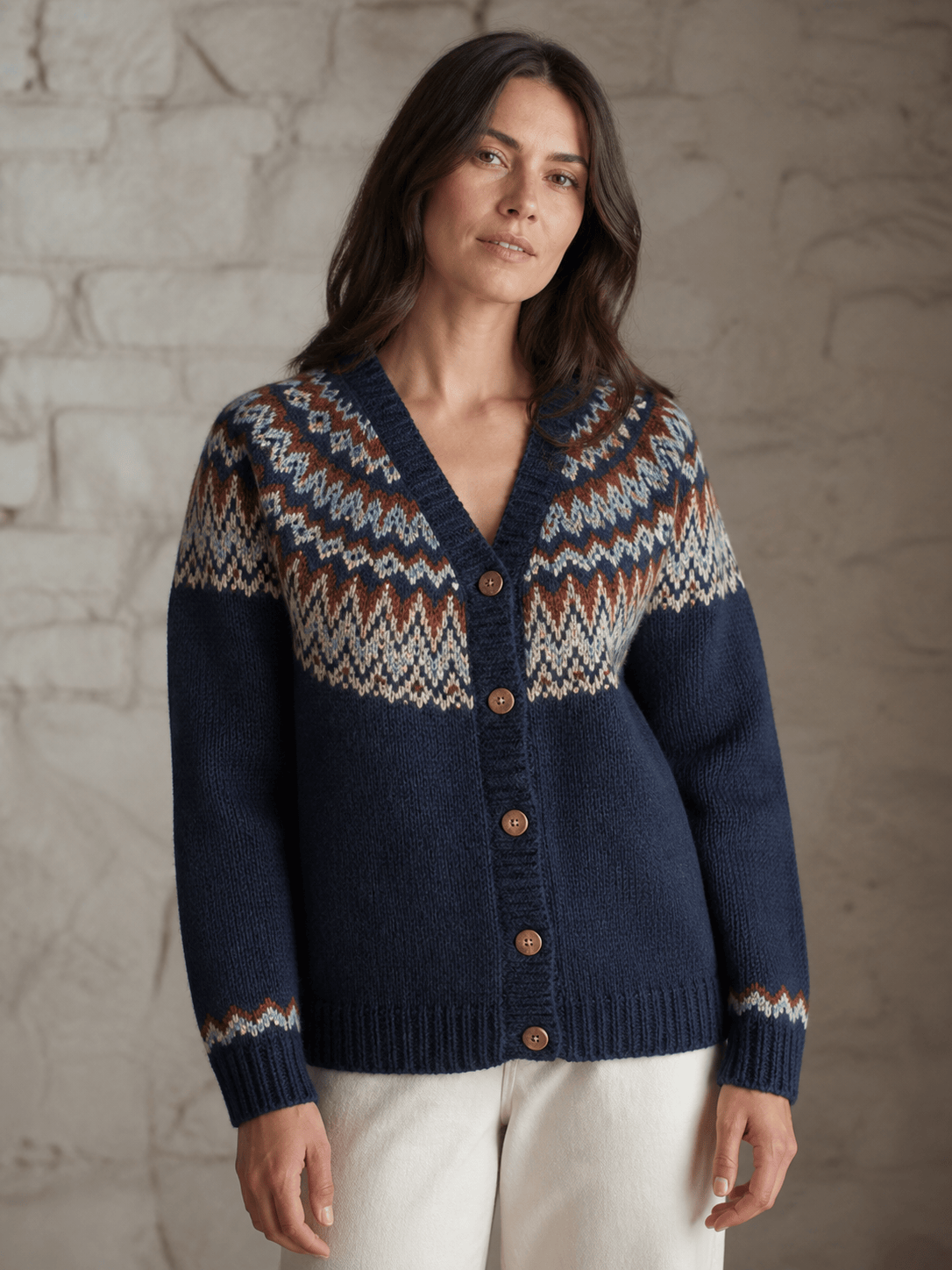
Modern Fair Isle cardigan: Design an adult cardigan with a boxy fit, V-neck, horn-style buttons, ribbed placket, and a contemporary Fair Isle yoke. Palette: navy, rust, oat, and pale blue in a disciplined four-color repeat. Show it on an adult model from mid-thigh up in a quiet winter studio; keep the pattern aligned across shoulders and sleeves.

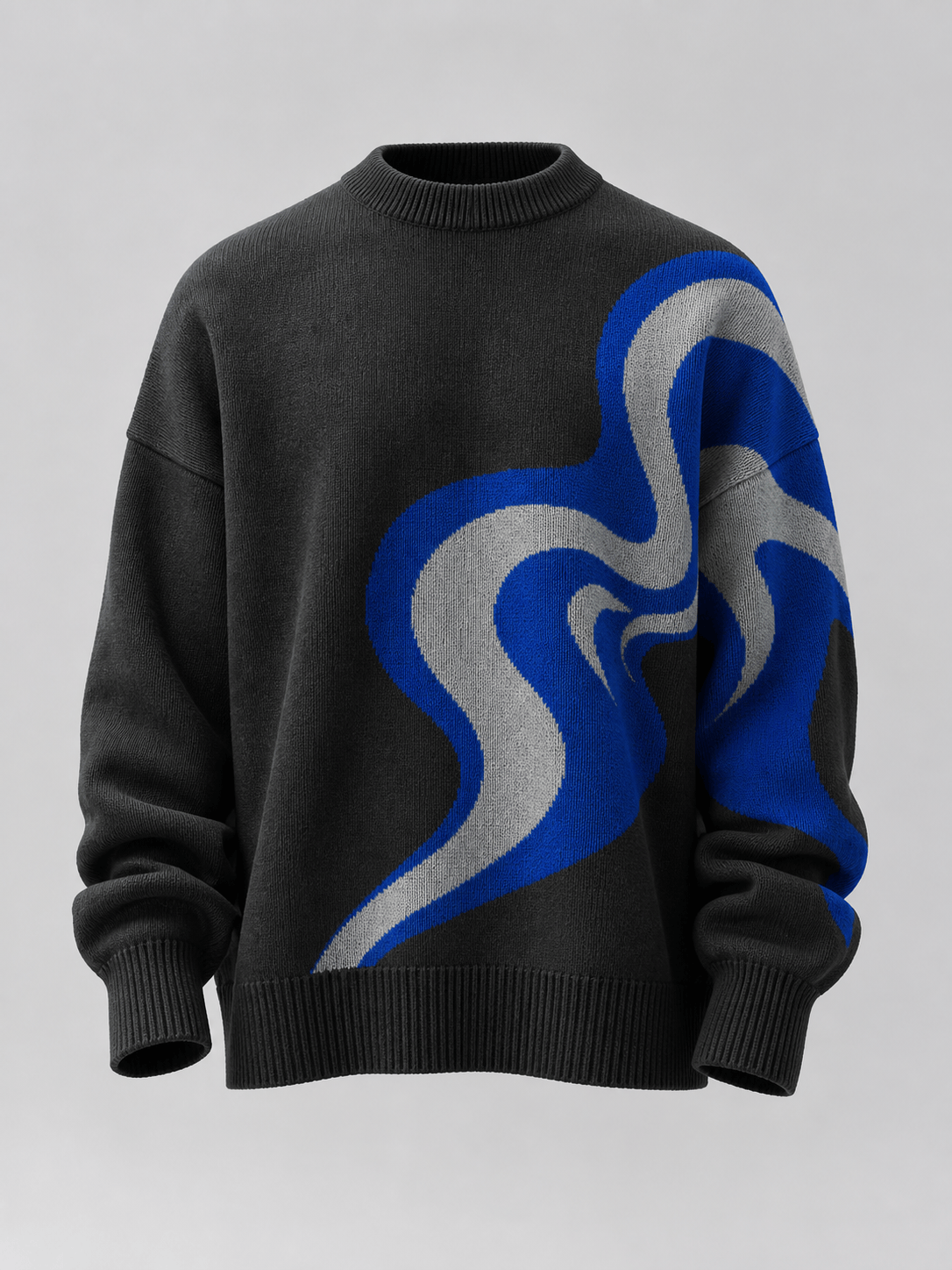
Streetwear intarsia: Generate an oversized charcoal sweater with a dropped shoulder, extra-long sleeves, compact rib collar, and a large abstract cobalt-and-silver intarsia shape wrapping from the front to one sleeve. Heavy cotton-wool knit, visible stitch grid, clean streetwear catalog lighting, front three-quarter product concept, no words or logos.

Branded team concept: Turn @[authorized team mark] into a simplified two-color knit motif for a forest-green varsity sweater. Regular fit, cream V-neck and cuff stripes, small left-chest motif, large but simplified back motif, sturdy medium-gauge wool. Produce a front-and-back flat review sheet; preserve the mark’s defining silhouette and add no extra lettering.

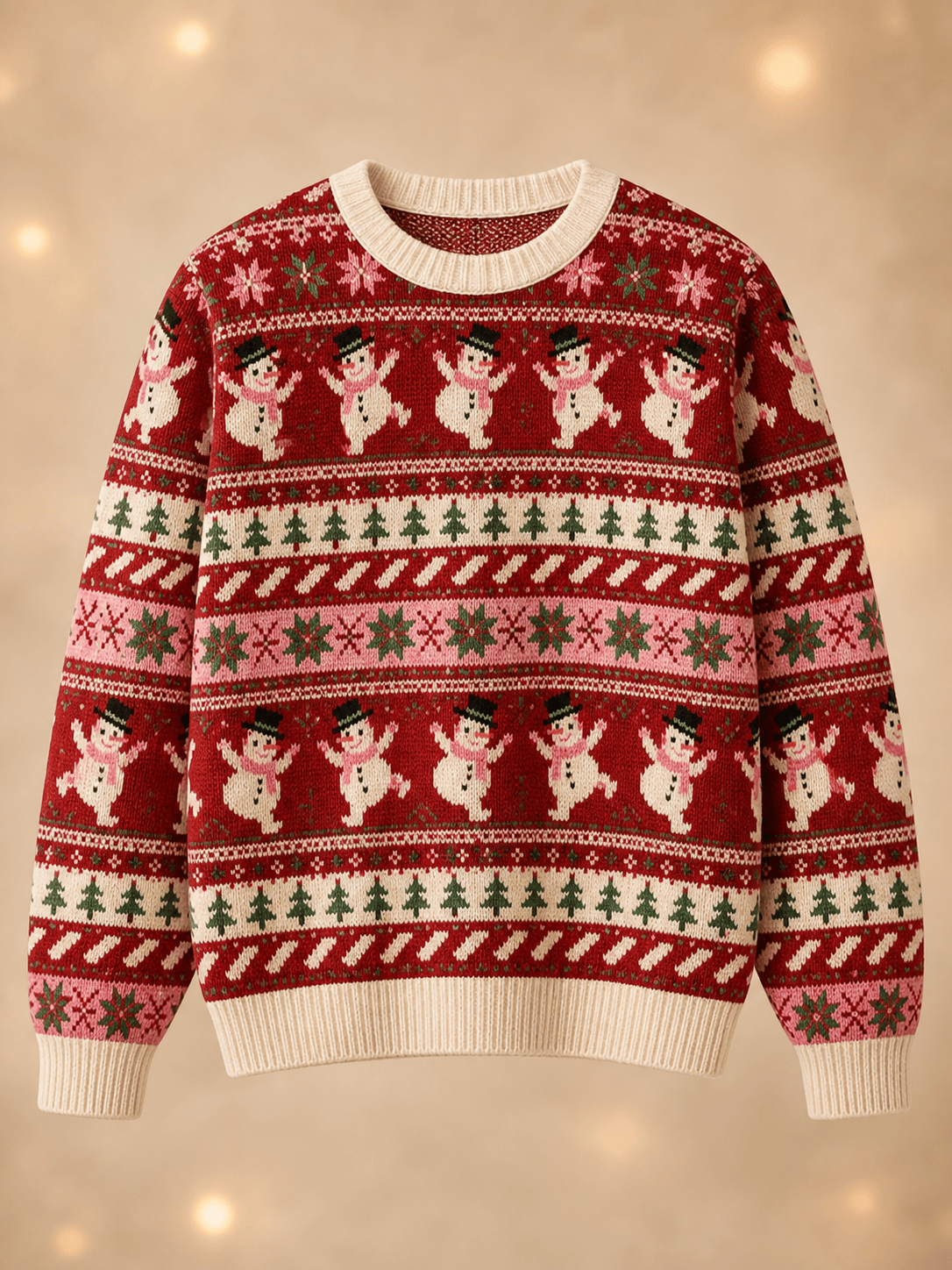
Ugly Christmas sweater: Create a playful AI ugly sweater concept with a cranberry-red base, deliberately crowded but readable Fair Isle bands, dancing snowmen, tiny pine trees, stars, and candy-cane diagonals in cream, emerald, and pale pink. Classic crewneck, relaxed fit, ribbed edges, realistic knit texture, clean front mockup on a neutral background, no slogan or trademarked character.

Children’s cardigan: Design a cheerful children’s raglan cardigan in soft sky-blue cotton yarn with a yellow seed-stitch texture, rounded wooden-style buttons, ribbed cuffs, two patch pockets, and small original cloud motifs along the hem. Show a clean flat lay with symmetrical sleeves and safe, simple details; concept art only, not sizing or safety certification.


AI Sweater Generator FAQ

It is a visual design tool that turns text, sketches, artwork, or reference images into sweater concepts and mockups. You can explore silhouette, neckline, yarn character, stitch texture, motifs, placement, colorways, and presentation views before moving into technical development.
Yes. You can sign up for Mew Design and use free AI credits to test a sweater direction. Each generation uses credits, and completed images can be downloaded as watermark-free PNG or JPG files.
Yes. Upload a permitted sketch, motif, garment reference, artwork, or logo and reference it with @ in the design conversation. Explain whether it should guide shape, stitch texture, palette, motif placement, or brand artwork, and review the generated result for drift.
Yes. Ask for a flat product view, front-and-back sheet, ghost-mannequin mockup, adult on-model concept, detail crop, or grouped colorway board. Generated mockups are useful for visualization, but they do not prove exact fit, fabric behavior, or production color.
Yes. An AI Christmas sweater generator prompt can combine original holiday motifs, Fair Isle bands, novelty colors, personalized artwork, and a realistic knit mockup. Avoid protected characters or unlicensed logos, and check small motifs, repeat rhythm, and text before using the concept commercially.
No. This page creates visual sweater concepts, not tested row-by-row instructions, stitch counts, graded measurements, yarn calculations, machine programs, or a production tech pack. A knitwear technician or manufacturer should translate and validate the selected concept before sampling or manufacture.
Commercial suitability depends on your Mew Design plan and terms, your rights to uploaded references, and how the design will be used. Clear any logo, artwork, character, or trademark rights, confirm originality, and have the final construction and claims reviewed before production or sale.
Use the AI clothing generator for broad apparel and collection concepts. Use the AI clothes changer to replace clothing in a person photo, or the AI fashion model generator for on-model ecommerce imagery from an existing garment. This page focuses on knitwear-specific sweater design decisions.

Ready to Generate Designs With AI?

Get Started - 50 Free Credits
No credit card required
© 2025 - 2026 Mew Design, MAGOAI LTD.All rights reserved.
Mew Design - Your AI design partner, now with full control. | Product Hunt