What's New

Built for what you’ll create next.

  1. GPT 2.6 Is Here—Bring Your Ideas to Life ✨

    1.0.2

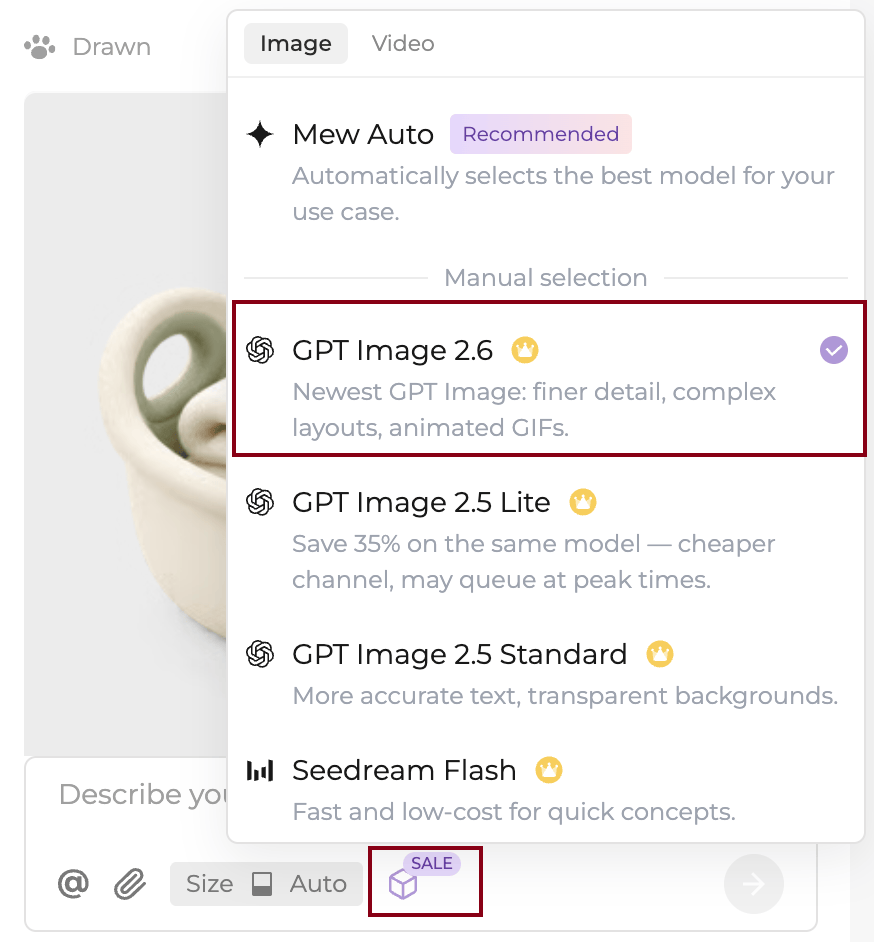
    GPT 2.6 is now available in Mew Design, opening up even more creative possibilities. With GPT 2.6, you can create high-quality images and generate animated GIFs directly in Mew Design. From looping brand visuals and eye-catching social content to creative concepts that come alive, simply describe your idea and let Mew turn it into a vivid visual. Try GPT 2.6 and take your ideas beyond static images.
  2. Multiple Models Are Here—More Possibilities for Every Idea ✨

    1.0.1

    You can now switch freely between image-generation models in Mew and choose the right one for each creative task. From standout brand visuals and eye-catching campaign assets to style exploration and fine-tuning details, try different models to find the result that best matches your vision. You can also keep Mew Auto selected and let Mew choose the model for you. Click the Model settings icon in the input box to switch models anytime. For your next idea, try a different model.

  3. Credit Billing Update: Get Ready to Create with Multiple Models

    0.9.28

    Starting October 19, Mew Design will move from a flat per-use credit charge to usage-based billing: use more, spend more; use less, spend less. Why are we making this change? Mew Design will soon offer multiple models to choose from. Some models are faster and use fewer credits, while others are better suited to handling complex designs and producing rich details. A flat per-use charge does not reflect these differences well. With usage-based billing, you can choose a lighter model for drafts and idea exploration, then switch to a more capable model when you are ready to finalize your design. This helps you spend credits where they matter and allows us to integrate new models more flexibly, giving you more creative options. How does this affect you? Overall, this change will benefit most users. Simple designs will use roughly the same number of credits as before or fewer. More than half of users fall into this group. A small number of users may see higher usage when creating designs with many elements or a more complex structure. Credit usage from each conversation will be combined into a single record. You can view it anytime under Credit Details on the Credits page. Thank you for your continued support. Multi-model selection is coming soon. Stay tuned.

  4. No need to explain where—just click to show Mew

    0.9.27

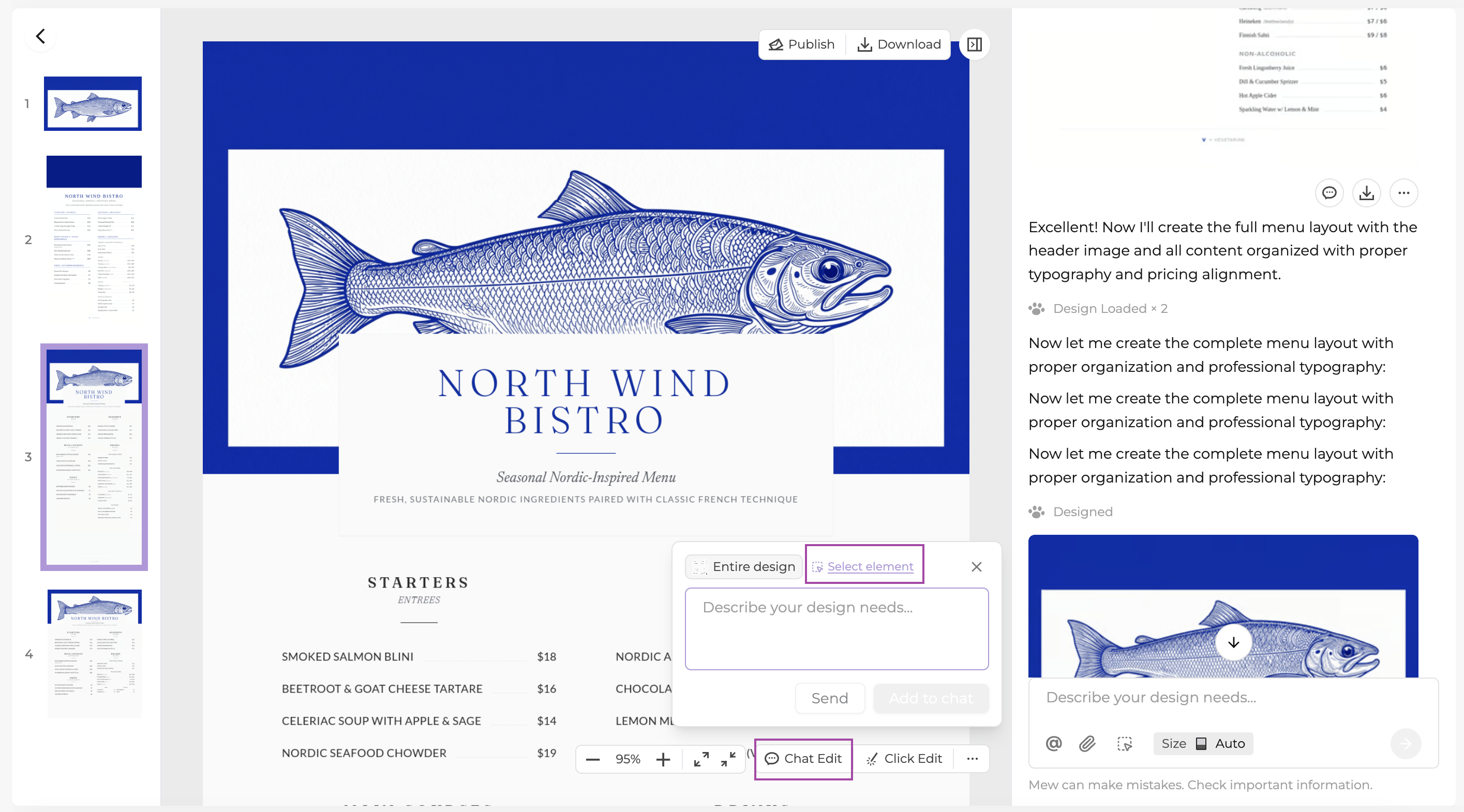
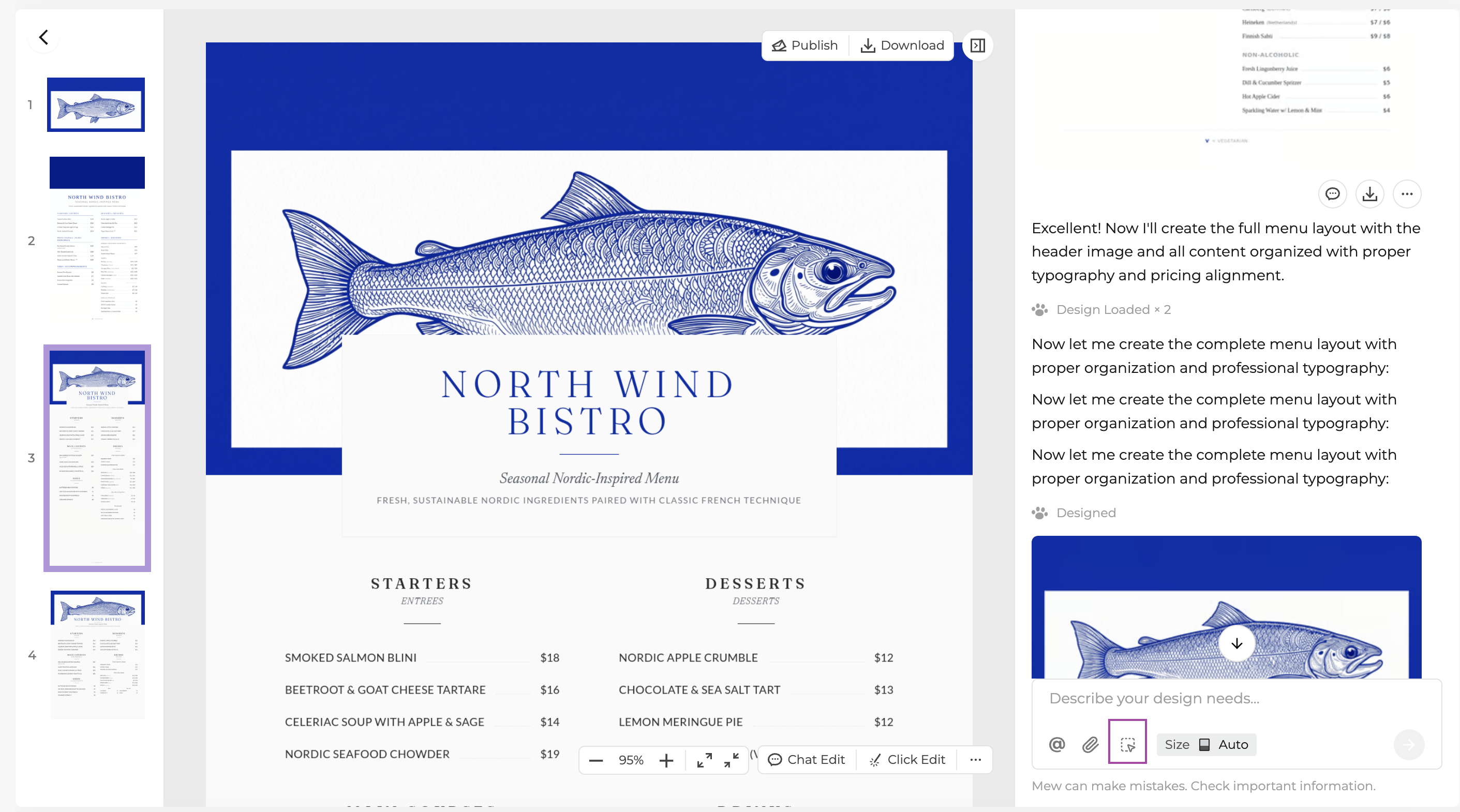
    Want to make a title larger or change the color of a shape? No need to describe its position as “the second line in the top-left corner.” You can now select text or a shape in your design and tell Mew how you’d like to change it. Your request includes the selected element, making it easier to show Mew what you mean. There are two ways to get started: - Click the selection icon in the toolbar of the chat input on the right. Its tooltip reads “Selection mode”.

    - Click “Chat Edit” at the bottom right of the design preview on the left, then click “Select element” in the pop-up.

    Select an element and type a request such as “Change this text to gold” in the pop-up. Click “Send” to submit it, or “Add to chat” to place both the selected element and your request in the chat input on the right. You can add more details before sending. This feature is available for editable designs with individually selectable elements. Designs generated as a single image do not support element selection yet. Use this feature on a computer.

  5. Share Your Experience with Mew Design and Earn Up to 500 Credits per Post

    0.9.26

    Share your real experience using Mew Design on X, Reddit, Quora, or Instagram to earn 200 or 400 credits. If your post reaches the required engagement threshold, you’ll receive an additional 100 credits. The campaign is available exclusively to users who have previously paid for Mew Design. Visit My Account → Rewards for details.

  6. Image Generation Now Supports Transparent Backgrounds

    0.9.25

    Mew Design’s image generation feature now supports directly generating images with transparent backgrounds and is available to paid subscribers. No need to remove backgrounds manually—just mention in your description that you need a transparent background to get an image ready to use. Whether you’re creating stickers, product assets, or visual elements to layer onto other designs, they can now fit more easily into your creative workflow.

  7. Meet GPT Image 2.5 — faster and more powerful

    0.9.24

    GPT image 2.5 is now available in Mew Design — faster and more powerful. Describe what you have in mind and let the Agent turn it into an image. Try it with your next idea and explore a new creative direction. Subscribers get priority access.

  8. Turn Your Go-To Methods into a Meow Skill and Get Started with One Sentence

    0.9.23

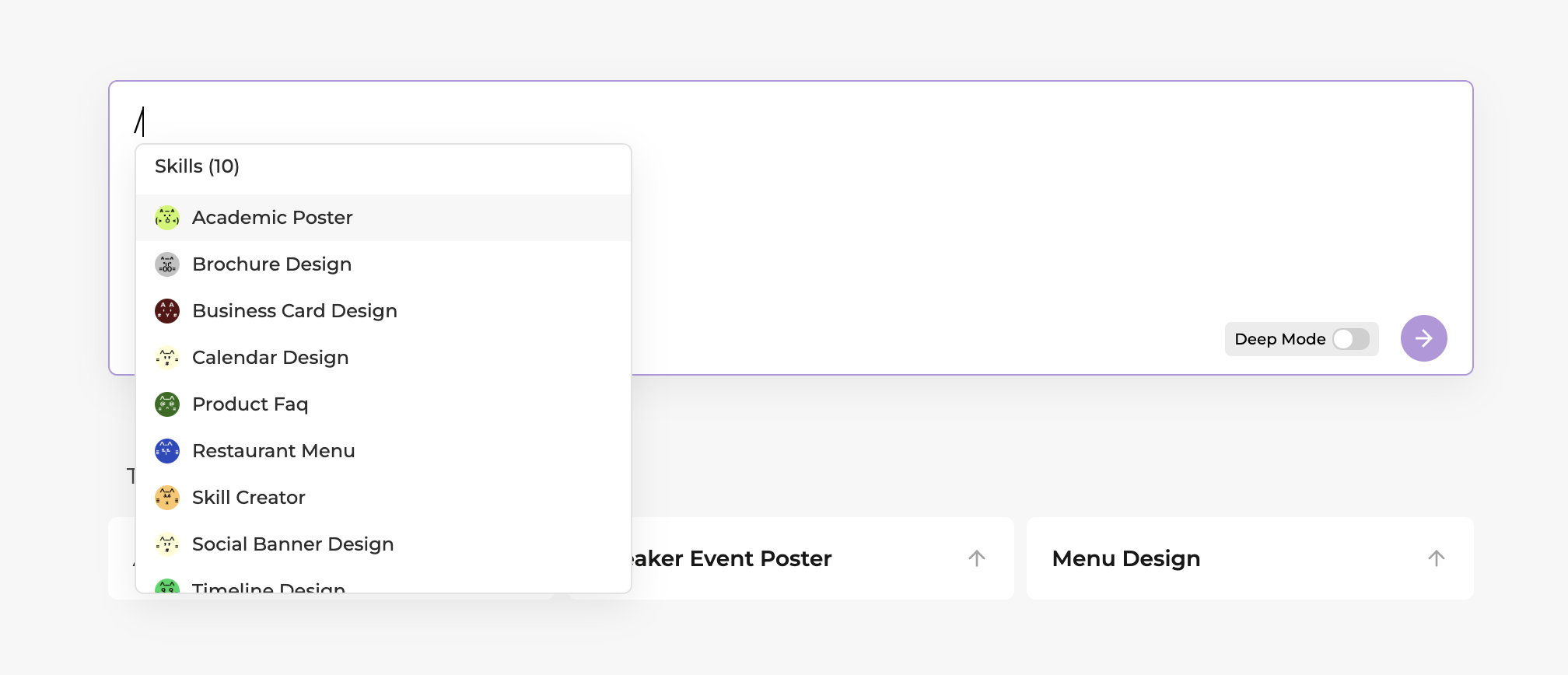
    Meow Skill is now live. Tell the Agent about your go-to workflows, style preferences, or execution rules in the input box, and it will organize and save them as a Skill. Next time, simply type “Use the ‘Weekly Operations Report’ Skill” in the input box, or type / to choose a Skill, and get started right away using your familiar methods.

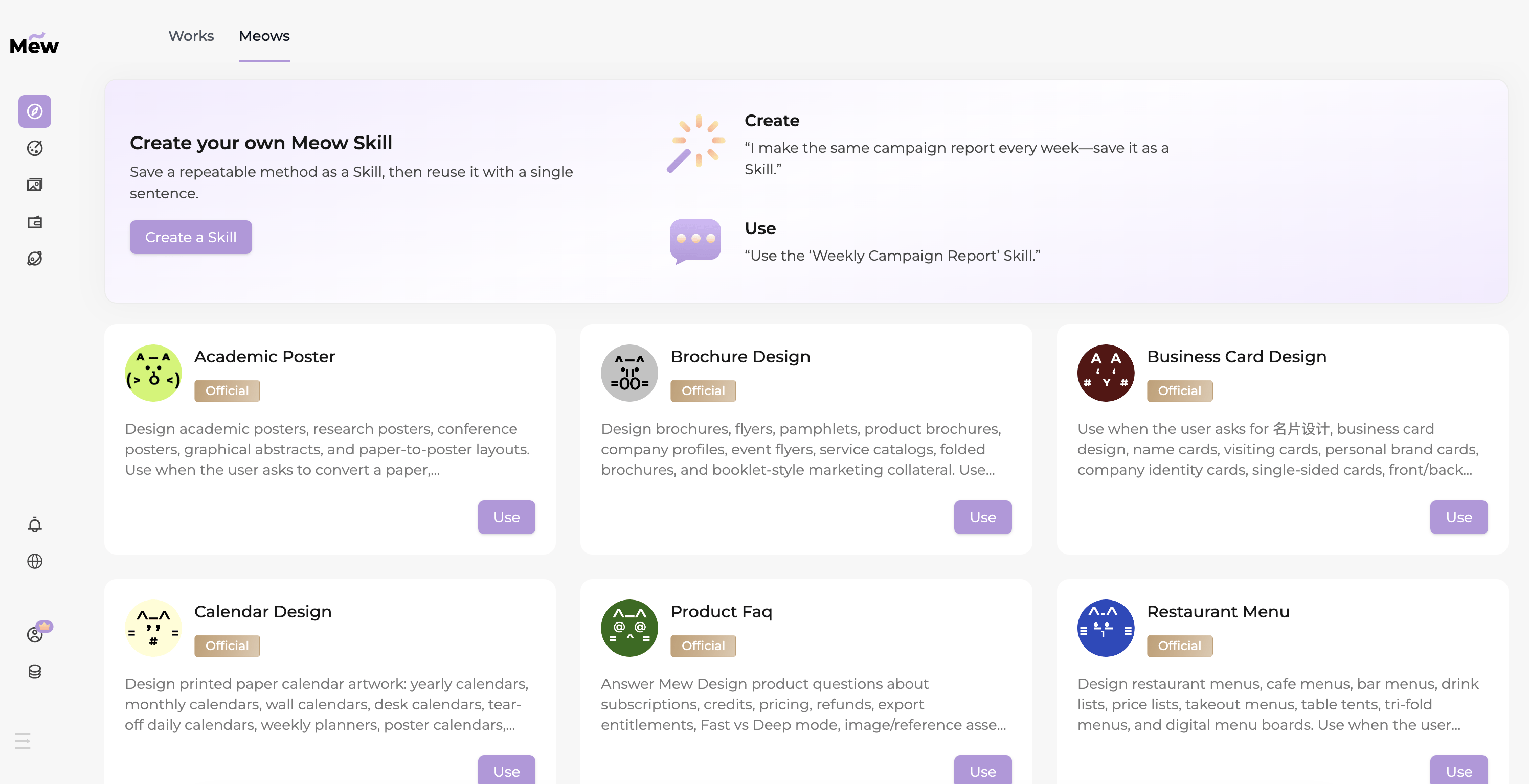
    You can also visit the Meows page in Explore, choose one of the official Skills we’ve prepared, and start designing right away!

  9. The right Meow Designer for every idea

    Update

    We’re reimagining the way you create with Meow Designer. In the future, Mew will better understand your design needs and automatically match each request with the Meow Designer best suited to the task. No manual selection—just focus on your idea and let your creativity flow. This feature is currently in development. We’ll also be introducing more Meow Designers, each with their own unique style and strengths, to give you an even richer creative experience. Stay tuned!

  10. A Better Way to Follow What’s New in Mew Design

    0.9.22

    We’ve launched a new What’s New page to make it easier to keep up with Mew Design. Here, you can discover new creative features, workflow improvements, important fixes, and other experience updates. You can also open What’s New directly from the Mew Design sidebar whenever you want to see the latest changes. This is only the beginning. We’ll continue improving Mew Design and sharing every meaningful update here. Thanks for creating with Mew Design 💜

© 2025 - 2026 Mew Design, MAGOAI LTD. All rights reserved.