Free OnlineFace Restoration AI
Mew Design - AI Design Agent helps restore a blurry, pixelated, noisy, faded, or scratched face from an uploaded photo. Use this online AI face restorer to rebuild clearer eyes, hair, skin texture, and facial contours while telling the editor which identity cues, expression, age, background, and vintage character must remain unchanged.

How to Restore a Face in a Photo with AI

Start with the best source you have, define what must stay recognizable, and compare every reconstructed detail with the original.
1

Upload the Best Available Copy

Use the highest-resolution scan or photo you can find. For paper prints, keep the image flat, hold the camera parallel, and avoid glare. A front or three-quarter face with visible eyes, nose, mouth, and hairline gives the AI face restorer more evidence.
2

Describe Damage and Identity Anchors

Name the actual problems—focus blur, motion blur, pixelation, compression, grain, fading, or scratches. Then list what must stay unchanged, such as face shape, age, expression, skin tone, hairstyle, glasses, facial hair, clothing, pose, and background.
3

Restore and Inspect the Face

Generate a restored portrait, then compare the eyes, mouth, nose, jaw, hairline, wrinkles, and accessories with the source. Face restoration AI predicts plausible detail where pixels are missing, so a sharper result is not automatically a more accurate identity.
4

Correct One Detail and Export

Use Chat Edit for focused corrections such as restoring the original eye shape, keeping age lines, reducing artificial smoothing, or leaving the photo monochrome. Save the approved version as PNG or JPG and keep the unedited original beside it.
how to restore a face with AI

Restoration Controls That Respect the Original Face

Target the Real Source of Damage

Tell Mew Design whether the face is out of focus, motion-blurred, pixelated, compressed, noisy, faded, scratched, or partly creased. Specific damage language helps this AI face restoration workflow avoid unrelated beauty edits.

Lock Identity-Sensitive Features

Name the facial structure, age cues, expression, skin tone, hairline, glasses, facial hair, and other traits that must remain recognizable. This gives the editor a clearer boundary between repair and reinvention.

Add a Clear Identity Reference

If the damaged face matters deeply, upload a separate clear photo of the same person as visual guidance. Ask Mew Design to use it only for identity cues while preserving the pose, lighting, clothing, and period character of the original.

Keep Restoration Separate from Colorization

Repair facial clarity while retaining black-and-white or sepia tones, or request color as a separate choice. The online AI face restorer can also leave the surrounding scene unchanged when only the face needs attention.

Compare Conservative and Strong Versions

Generate a restrained restoration and a stronger detail reconstruction, then judge both against the source. Use Chat Edit to reduce plastic skin, invented lashes, changed wrinkles, or other signs of overprocessing.

Start with Free Credits

Try face restoration AI online with free credits after signup. Refine the result through chat and export an approved PNG or JPG image without a watermark.

How to Prompt AI Without Changing the Person

Restore the face in @[uploaded photo] with a conservative, identity-preserving edit. Reduce mild focus blur, JPEG blocks, dust, and two small scratches across the cheek. Reconstruct natural eye, eyebrow, hair, and skin detail without changing the person's face shape, apparent age, expression, eye spacing, nose, mouth, jaw, hairstyle, glasses, clothing, pose, crop, background, or original sepia tone. Keep realistic pores, wrinkles, and film grain. Do not beautify, colorize, replace the face, or invent missing accessories. If any feature is too damaged to infer confidently, make the smallest plausible repair.
A reliable prompt for face restoration AI defines the damage, the desired repair strength, the identity anchors to protect, and any optional reference photo of the same person.
  • Diagnose before styling: Say whether the problem is blur, pixelation, compression, noise, fading, scratches, creases, or small missing areas. Do not ask for a generic makeover when you want faithful repair.
  • Write a preservation list: Protect face shape, age, expression, eye spacing, nose, mouth, jaw, hairline, skin tone, glasses, facial hair, pose, clothing, crop, and background as needed.
  • Separate optional tasks: Treat colorization, full-image repair, background cleanup, and enlargement as separate choices. Restore the face first when you want to judge identity without extra changes.
  • Review at 100%: Compare the original and restored face around the eyes, teeth, ears, hairline, wrinkles, and accessories. Ask Chat Edit for one or two precise corrections per pass.

Face Restoration Prompts for Blur, Damage, and Old Photos

Mild Motion Blur: Restore the adult subject's face in @[uploaded portrait]. Reduce horizontal motion blur around the eyes, nose, and mouth while preserving identity, expression, freckles, hairstyle, skin texture, clothing, pose, background, and original light. Keep pores natural and avoid beauty retouching.

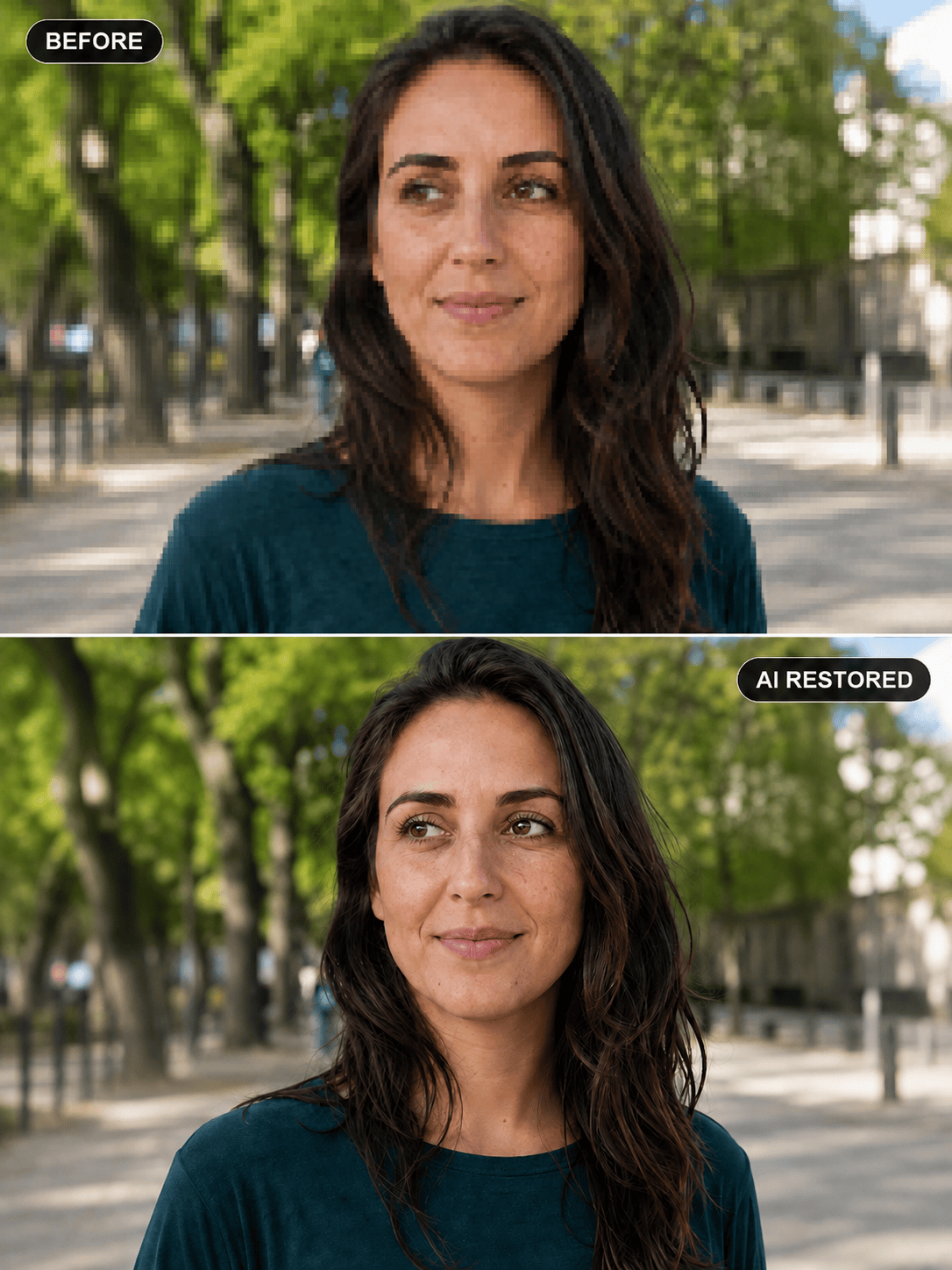
Pixelated Face in a Small Crop: Fix the pixelated face in @[uploaded image] with a conservative AI face restoration. Rebuild clean but natural eyes, eyebrows, lips, and hair edges; reduce JPEG blocks; preserve face shape, age, skin tone, glasses, head angle, crop, and background. Do not enlarge the eyes or smooth away texture.

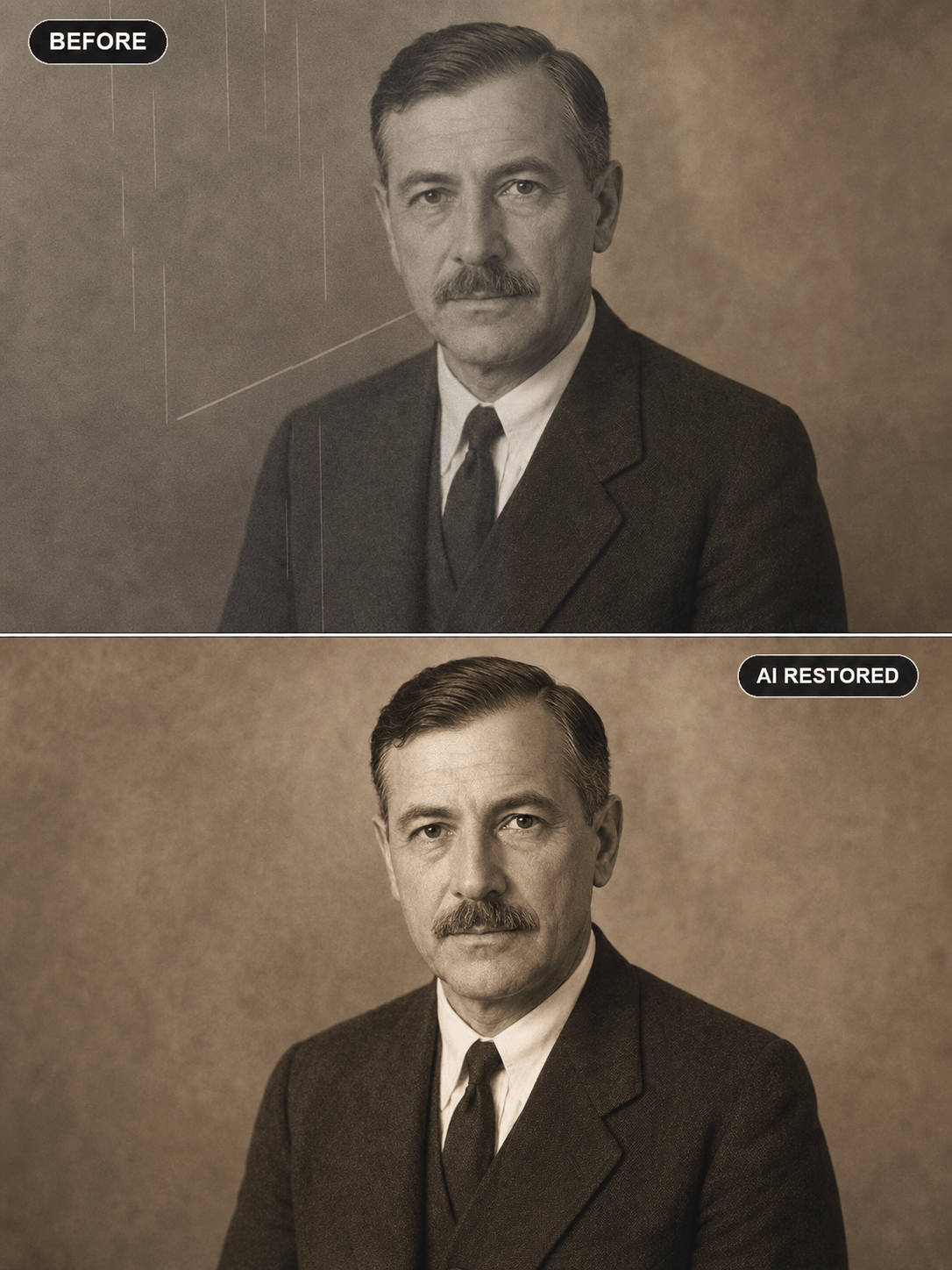
Scratched Sepia Portrait: Repair dust, fine scratches, one crease, and faded contrast in @[old portrait]. Restore the adult subject's facial clarity while keeping the exact apparent age, expression, hairstyle, clothing, sepia tone, paper texture, and period lighting. Do not colorize or modernize the image.

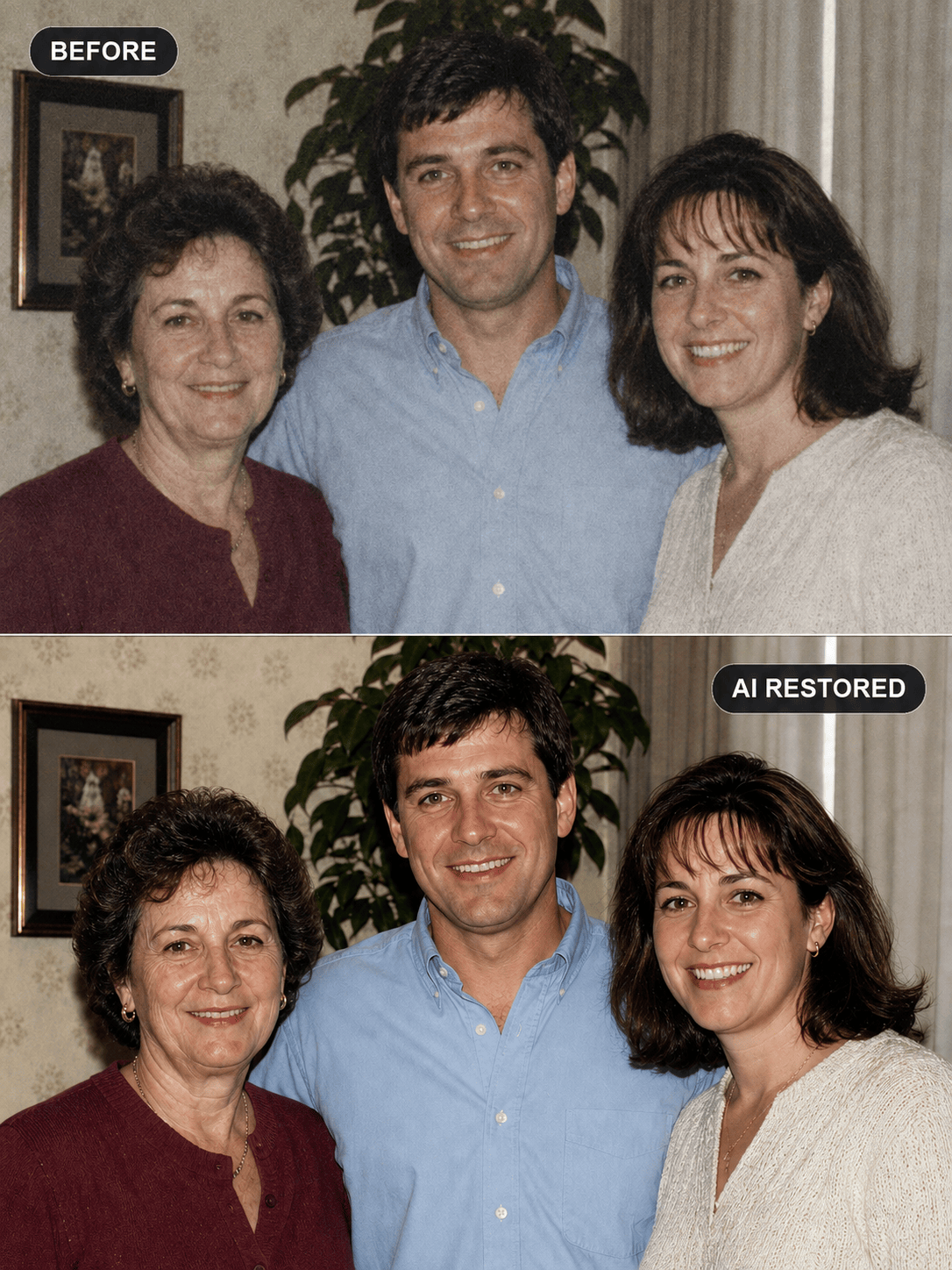
Faces in a Family Group Photo: Restore the visible adult faces in @[1990s family photo] one by one. Reduce softness and scan noise while preserving each person's distinct features, age, expression, hairstyle, clothing, spacing, pose, flash lighting, and original background. Keep the authentic 1990s color and film character.

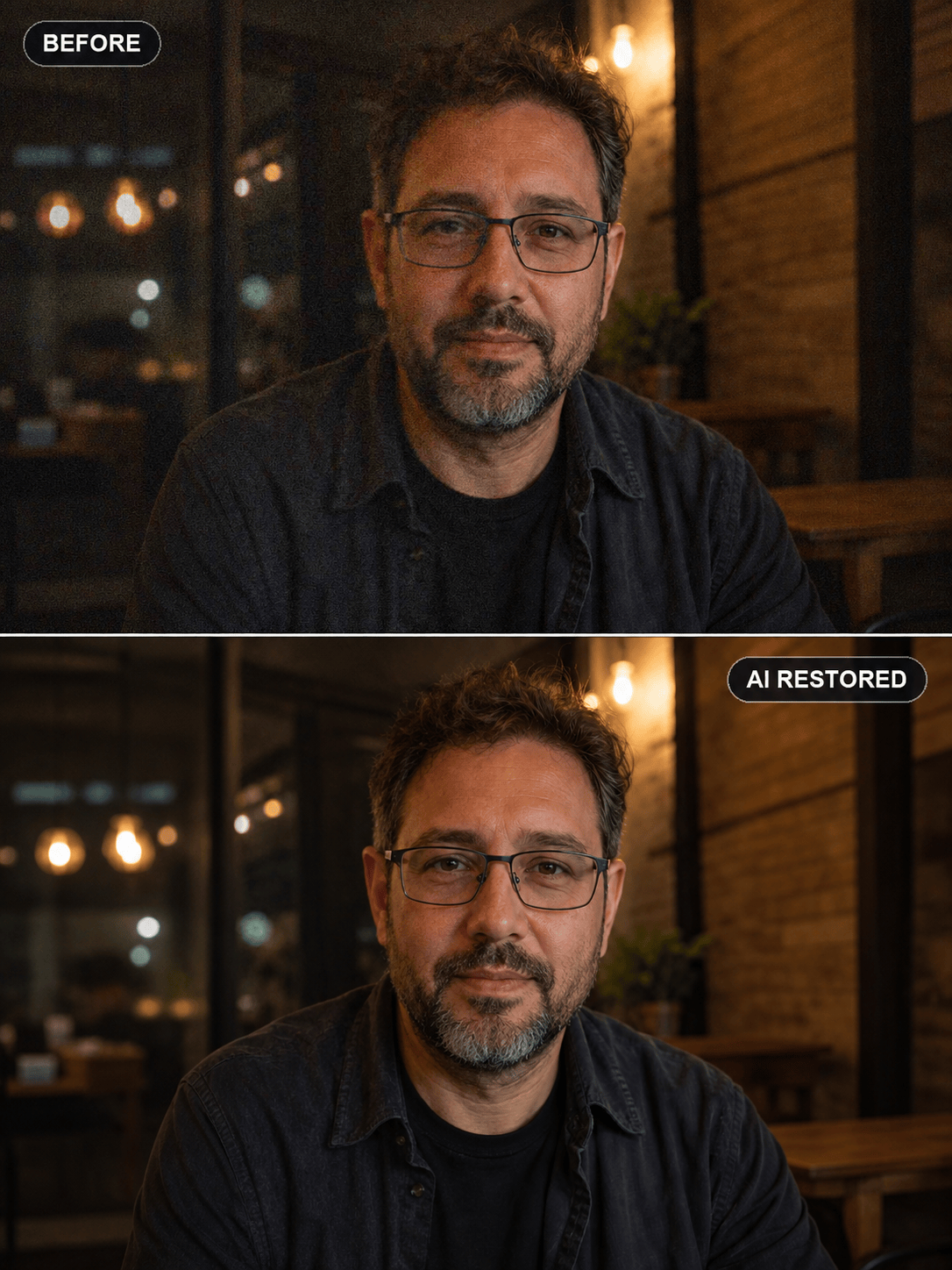
Noisy Low-Light Portrait: Clean heavy chroma noise and mild focus blur from the face in @[night portrait]. Restore natural eyes, hair, beard, and skin texture while preserving glasses, expression, face proportions, warm café lighting, shadows, clothing, and background bokeh. Do not brighten the scene into daylight.

Damaged Face with a Clear Reference: Use @[damaged portrait] as the base and @[clear photo of the same adult] only as an identity reference. Repair the small missing area over one eyebrow and cheek, reduce scratches, and restore restrained detail. Preserve the base photo's age, pose, expression, clothing, crop, monochrome tone, grain, and background.


FAQs About Face Restoration AI

Face restoration AI is an image-editing process that detects a degraded face and reconstructs clearer facial detail. It can reduce blur, noise, pixelation, compression artifacts, fading, and small areas of damage, but it predicts plausible information rather than recovering every lost pixel as fact.
Yes. New Mew Design users receive free AI credits after signup. You can upload a portrait, request a restoration, correct details through chat, and export an approved image without a watermark; additional generations may require more credits.
Clear source evidence and explicit preservation instructions improve consistency, but no generative restorer can guarantee an exact likeness when important pixels are missing. List identity anchors, add a clear reference photo of the same person when available, and compare every result with the original.
Use the largest, least-compressed copy available. Front or three-quarter faces with visible features work better than tiny, heavily covered, extreme-profile, or glare-obscured faces. For paper photos, make a straight, evenly lit scan or camera capture first.
It may create a visually plausible repair, especially with another clear photo of the same person, but uncertainty rises as damage increases. If the eyes, nose, or mouth are fully missing, the output may invent identity details and should not be treated as an authentic reconstruction.
It can address several visible faces, but very small, overlapping, turned-away, or partly hidden faces are harder. Ask for one conservative pass, inspect each person separately, and correct only the faces that drift from the source.
No. Face restoration reconstructs facial detail; upscaling increases image dimensions; denoising reduces grain; whole-photo restoration repairs broader damage; and colorization adds estimated color. Request them separately when you want tighter control.
No. AI may generate convincing details that were not present in the source. Keep the original, label restored versions when context could mislead, use only photos you own or have permission to edit, and never rely on a generated face for forensic identification or documentary proof.

Ready to Generate Designs With AI?

Get Started - 50 Free Credits
No credit card required
© 2025 - 2026 Mew Design, MAGOAI LTD.All rights reserved.