Free OnlineAI Eyebrow Shape Detector
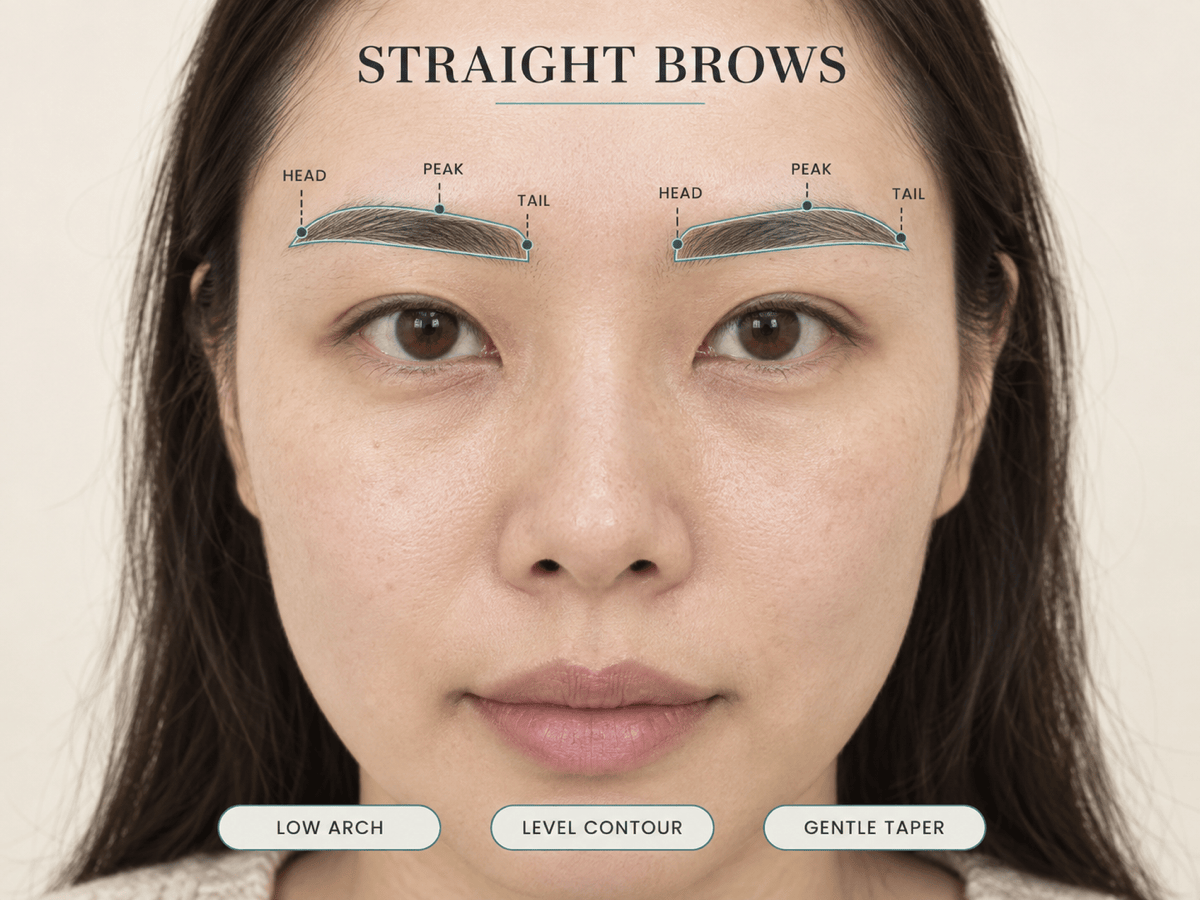
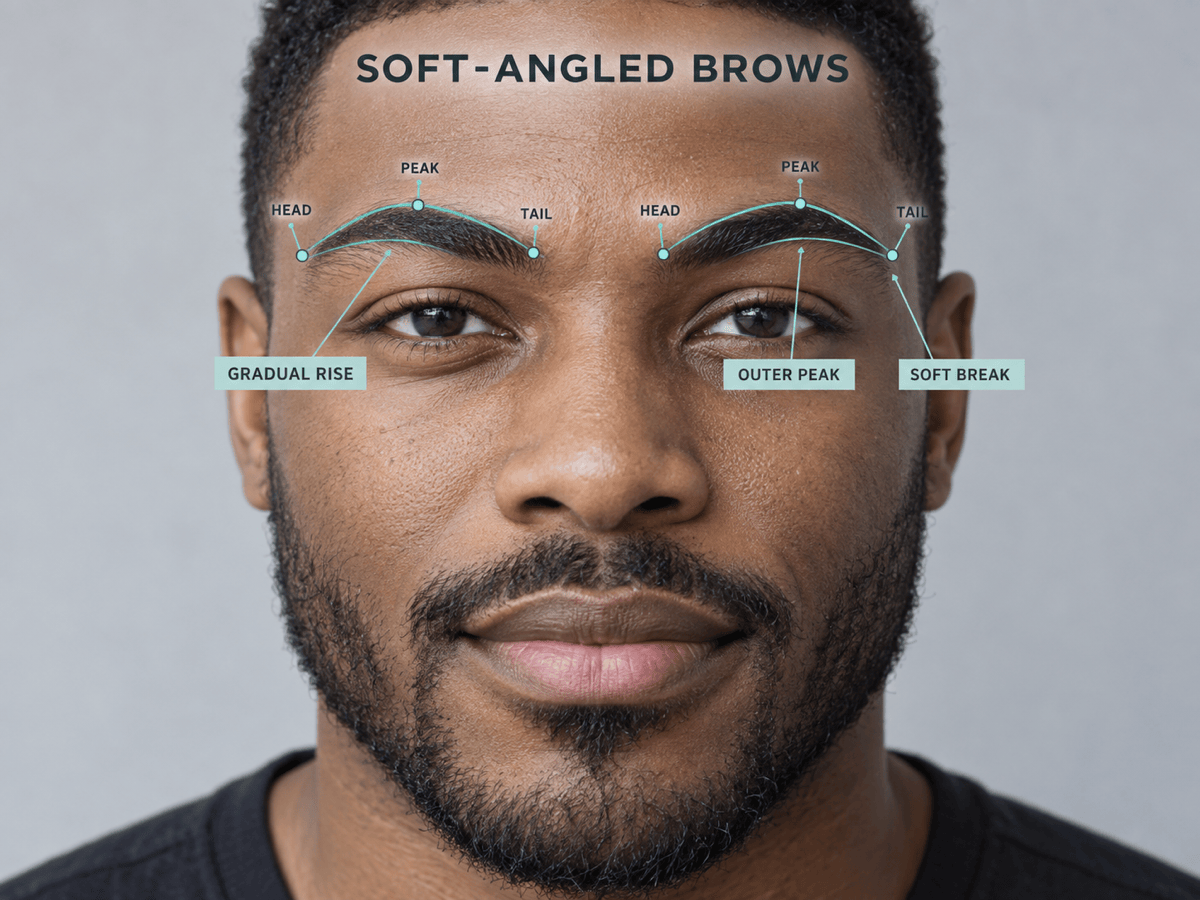
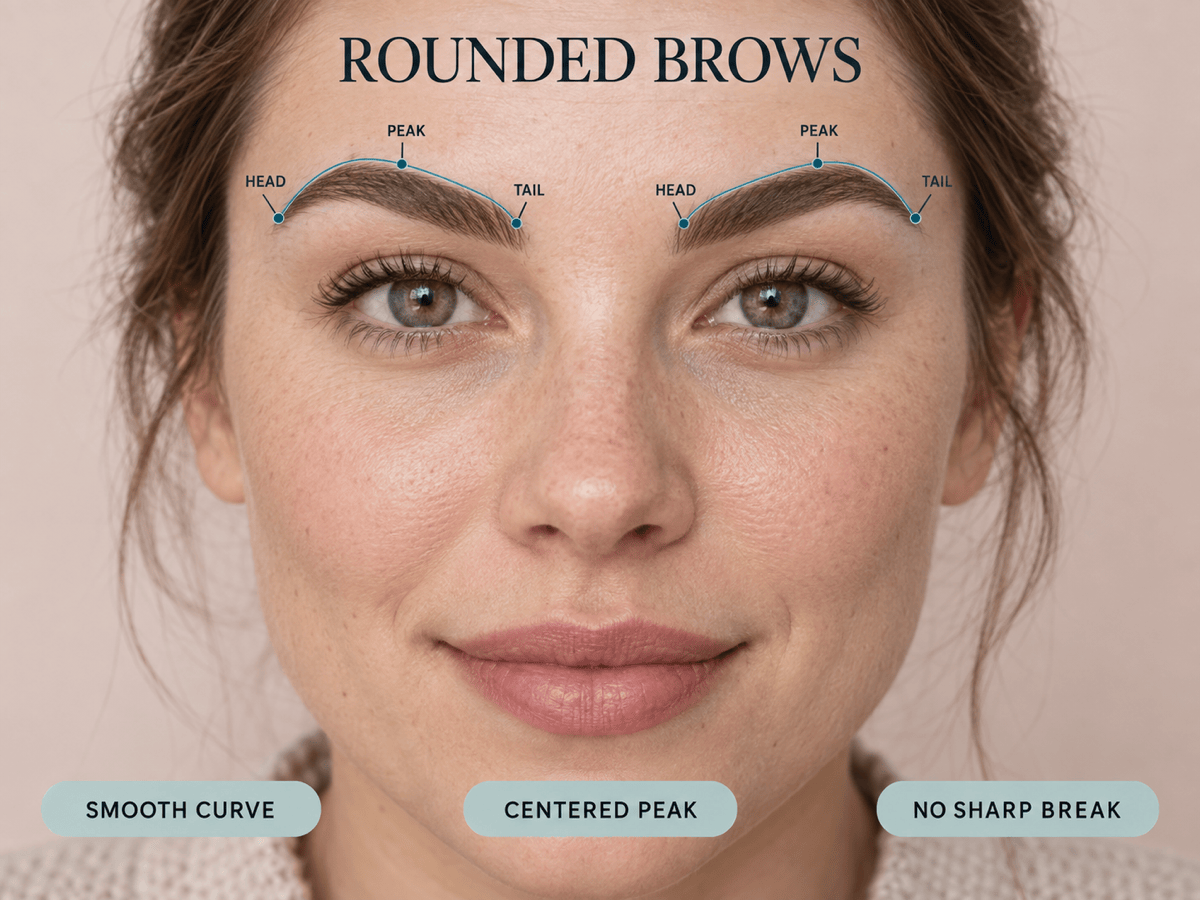
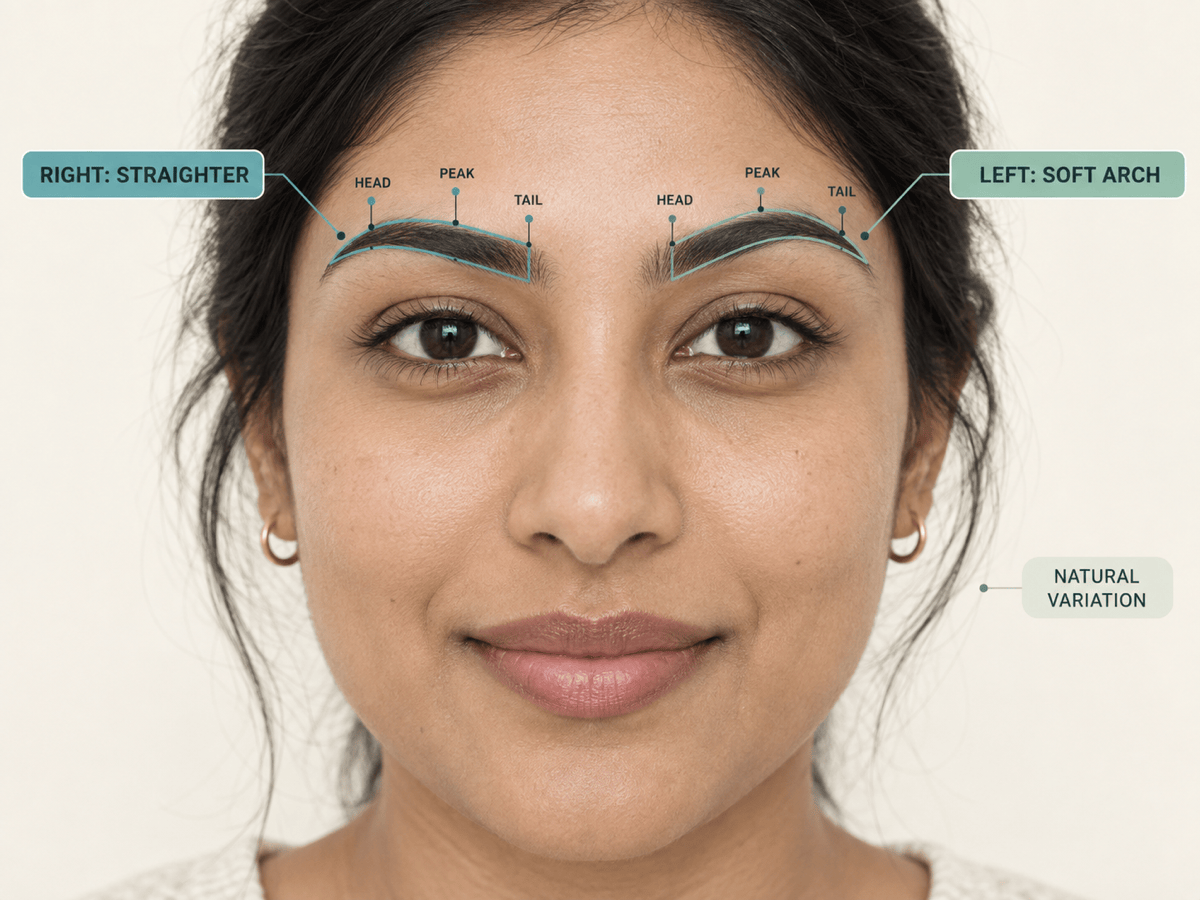
Upload one clear portrait and use Mew Design - AI Design Agent as a visual eyebrow shape analyzer. Ask it to identify the closest common brow type, trace each eyebrow on your face, mark the head, peak, and tail, and explain visible traits such as contour, arch, direction, thickness, and natural left-right differences. The annotated result helps answer “what eyebrow shape do I have?” without turning your face into a beauty score.

How to Detect Your Eyebrow Shape From a Photo

Create a clear brow-type result on your own face, with visual evidence that explains the label instead of leaving you with a generic answer.
1

Upload One Clear Portrait

Choose a sharp, front-facing photo with one face, a level chin, relaxed forehead, and even light across both eyes. Keep hair away from the brows and use little or no brow makeup. A reliable eyebrow shape detector from photo needs the natural outline to remain visible.
2

Define the Shape Test

Ask the eyebrow shape finder to compare your visible brows with common types such as straight, rounded, arched, soft angled, hard angled, or S-shaped. Request separate observations for the left and right brow when they do not match exactly.
3

Create an Annotated Brow Result

Tell the AI to keep your portrait unchanged, trace both brow contours, mark the head, peak, and tail, and place the closest brow-type label directly beside the face. Add short notes for arch position, direction, thickness, density, and taper so the result shows why the label fits.
4

Review, Refine, and Export

Read the type together with the visible evidence. If a label is vague or the callouts cover your brows, use Chat Edit to correct one issue at a time. Export the result as a PNG or JPG for personal reference; use a separate preview only if you later want to test a new shape.
how to detect eyebrow shape from photo

Why Create Your Eyebrow Shape Report With Mew Design

See the Result on Your Own Face

A text label alone can feel arbitrary. Mew Design can turn your uploaded portrait into an annotated eyebrow analysis card, keeping both brows visible while the type and supporting observations sit beside the features they describe.

Keep Left and Right Evidence Separate

One eyebrow may look straighter while the other has a clearer arch. Ask this AI eyebrow shape detector to trace and describe each brow separately instead of forcing natural differences into one perfectly symmetrical template.

Explain the Shape, Not Just Name It

Add concise callouts for contour, arch position, rise, tail direction, thickness, density, and taper. These visible cues make an eyebrow shape test online easier to understand and less dependent on a single category word.

Choose a Clear Brow-Type Taxonomy

Tell the eyebrow shape analyzer which common categories to compare—such as straight, rounded, arched, soft angled, hard angled, or S-shaped. Stating the options keeps the report consistent while allowing mixed or in-between results.

Preserve the Unedited Portrait

Ask Mew Design to add only outlines, markers, and labels. Keep identity, facial proportions, skin texture, expression, hair, makeup, lighting, and background unchanged so the report analyzes the submitted photo rather than a beautified replacement.

Refine a Shareable Result Card

Use Chat Edit to move a label, simplify a note, change annotation colors, or improve legibility without rebuilding the result. Start with free AI credits after signup and export watermark-free PNG or JPG images when the report is ready.

How to Photograph Your Brows for a Clearer Result

Analyze the visible eyebrow shape in this front-facing portrait. Keep the person and photo completely unchanged. Compare both brows with these common types: straight, rounded, arched, soft angled, hard angled, and S-shaped. Trace each brow with a thin outline, mark HEAD, PEAK, and TAIL, label the closest type beside the face, and add short neutral notes about contour, arch position, direction, thickness, density, taper, and left-right differences. Do not add a beauty score, percentage, exact measurement, or claim of perfect symmetry.
Photo quality changes what an AI eyebrow shape detector can see. The strongest input shows the natural contour of both brows and enough surrounding facial context to explain placement without guessing from a tight crop.
  • Face the Camera Directly: Keep your chin level and center one face in the frame. A side angle or tilted head can make one arch look higher or one tail look shorter than it does straight on.
  • Relax Your Forehead: Look ahead without raising, frowning, or squeezing the brows. Expression changes arch height and can make the left and right contours look less comparable.
  • Use Even Frontal Light: Soft daylight from in front helps preserve fine hair edges. Avoid strong side light, dark shadows, blur, beauty filters, or glare across the brow area.
  • Show the Natural Brow Line: Move hair and hats away from the brows and use minimal pencil, pomade, concealer, gel, or lamination styling if you want the report to describe your natural baseline.

What an Eyebrow Shape Report Can Label

Identify the closest primary eyebrow shape in my photo. Compare straight, rounded, arched, soft angled, hard angled, and S-shaped contours. Place the best-match label beside my face and list the two visible traits that support it without adding a score or exact measurement.

Analyze my left and right eyebrows separately. Trace each contour with a thin line, label each brow with its closest type, and note where their shape, arch, direction, or tail differs. Describe the difference neutrally and do not call natural asymmetry a defect.

Focus on contour and arch position. Mark the highest visible point of each brow, show whether the rise and fall is level, smoothly curved, or clearly angled, and add a concise note explaining whether the peak sits near the middle or outer portion.

Review eyebrow thickness, visible density, and taper in this photo. Outline the upper and lower brow edges, note whether the head, body, and tail look relatively full or fine, and avoid assuming that sparse areas are flaws or giving medical advice.

Create an AI brow mapping view on my unchanged portrait. Add small HEAD, PEAK, and TAIL markers for both eyebrows, keep the labels outside the hair, and connect each marker with thin callout lines. Do not add ratios, percentages, or facial-mesh points.

Summarize my eyebrow shape analysis in one clean result card. Keep the original face unretouched, show the primary type plus any left-right variation, list three visible traits, and add one optional makeup or grooming consideration framed as a choice rather than a rule.


AI Eyebrow Shape Detector FAQs

It is a photo-based tool that reviews the visible contour of your brows and estimates the closest common shape type. A useful result labels the type on your portrait and explains it with evidence such as arch position, direction, thickness, tail, and left-right differences.
Upload one sharp, front-facing portrait with both brows visible, then ask for a labeled analysis. Keep your head level, expression relaxed, lighting even, and brow makeup minimal so the visible outline is easier to compare with common shape categories.
You can ask it to compare common categories such as straight, rounded, arched, soft angled, hard angled, and S-shaped. Taxonomies vary and some brows sit between categories, so the supporting visual traits matter more than forcing one rigid label.
An outline and a few well-placed markers show which contour, peak, direction, and tail the label refers to. This makes the analysis easier to verify than a text-only answer and helps you notice when the two brows do not follow exactly the same path.
Yes. One brow may appear straighter, higher, fuller, or more angled than the other because of natural growth, facial structure, expression, grooming, or camera angle. Ask for separate labels and neutral notes instead of an averaged result.
Yes. Pencil, pomade, concealer, lamination, raised brows, a head tilt, shadows, hair, or blur can change the visible contour in a photo. Retake the image with a relaxed forehead, even frontal light, and minimal brow styling for a clearer natural baseline.
No. A detector describes the brows currently visible in your photo, while a filter or virtual try-on changes their appearance. Start with detection if your question is “what eyebrow shape do I have?” and move to a preview only when you want to test alternatives.
Use the report as a visual reference, not a procedure plan. It cannot account for every factor that matters to hair removal, tinting, lamination, microblading, powder brows, or healing. Confirm any lasting or skin-breaking change with a properly trained or licensed professional.

Ready to Generate Designs With AI?

Get Started - 50 Free Credits
No credit card required
© 2025 - 2026 Mew Design, MAGOAI LTD.All rights reserved.